claribi.com
What it offers — 24 tools · Developer Tools
check_integration_statusPoll an OAuth handoff initiated by request_oauth_integration_url. Returns the current status (pending, connected, failed, expired) and, when connected
check_pricingList clariBI subscription tiers with prices, AI credits, data source limits, user limits, and headline features. No authentication required.
create_checkout_sessionCreate a Stripe Checkout URL the user can open in a browser to upgrade their clariBI subscription. Payment cannot happen inside the LLM; this tool ret
create_forecastBind a forecast to a metric in your workspace. Stores the configuration, sets up the schedule, and resolves the source binding immediately so a bad so
generate_reportCreate a new generated report in your clariBI organization. Returns the report id you can poll via get_report, plus a download URL once status reaches
get_analysis_statusCheck the status of a previously-dispatched run_analysis job. Returns the analysis result if completed.
get_billing_statusGet the organization's billing status — tier, renewal date, and upgrade options.
get_dashboardFetch one dashboard by ID. Includes widget definitions, the most recent refresh data, and the web URL.
get_data_source_schemaFetch the column schema for a data source. Useful before asking run_analysis about specific columns. The schema is derived from the preprocessing meta
get_forecastFetch one forecast configuration by ID.
get_forecast_runFetch one run of a forecast by ID, or pass run_id="latest" for the most recent run. Returns the full forecast envelope: target series + 30-day project
get_reportFetch one generated report by ID.
get_usageGet the organization's current AI credit usage, data source count, user count, and rate-limit headroom.
ingest_url_data_sourceCreate a new data source by fetching a public URL on the server side. Handles CSV, TSV, JSON, Excel, TXT, and PDF. Private networks (RFC 1918, loopbac
list_dashboardsList dashboards in your clariBI organization. Returns id, name, status, last refresh, and a URL you can open in a browser.
list_data_sourcesList the data sources connected to your clariBI organization. Returns id, name, source_type, status, last sync time, and the number of rows (when know
list_forecastsList metric forecasts in your clariBI organization. Each row covers one metric: its source binding, horizon, schedule, and the latest run status. Use
list_reportsList generated reports in your clariBI organization. Returns id, title, status, output format, and download URL.
+6 more tools
- ✓ initialize → protocolVersion 2025-03-26
- ✓ initialize HTTP 200
- ✓ unknown method → -32601
- ✓ tools/list → 24 tools
- ✓ every tool has name + inputSchema
- 24 tools scanned
- no injection markup
- no secret-path refs
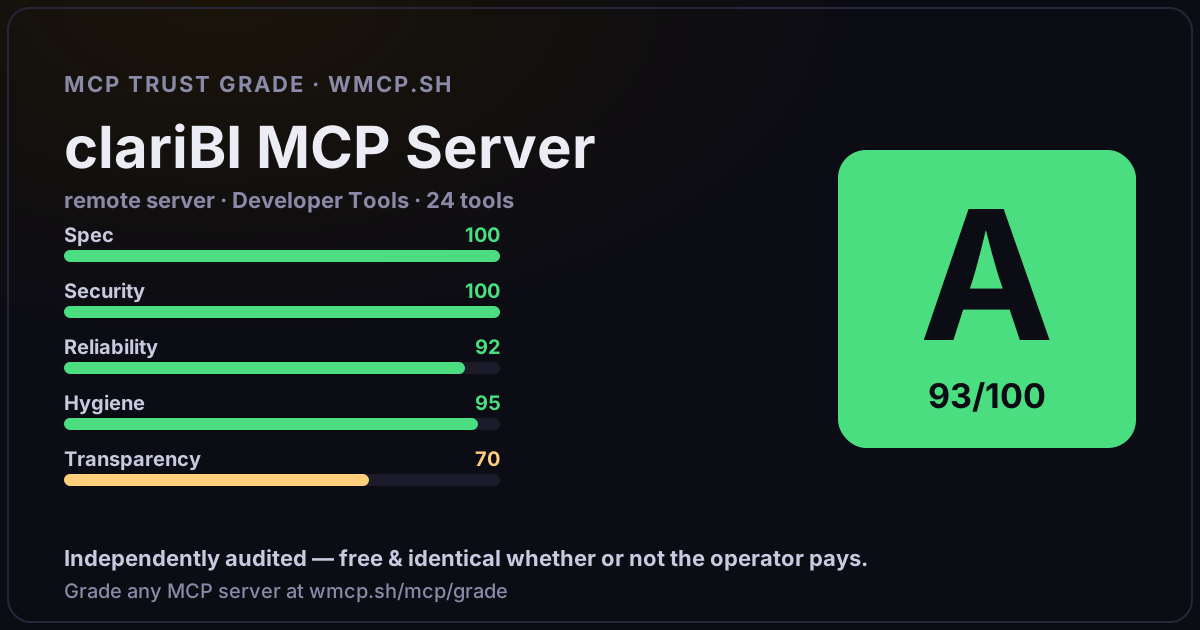
- single-probe latency 329ms (PRELIMINARY — continuous uptime/p95 from proxy telemetry lands in v2)
- 92% of tools have typed inputSchema
- 24/24 declare outputSchema
- no unannotated destructive tools
- HTTPS ✓
- advertises protocol 2025-03-26
Observed behavior
No proxied traffic observed for this host yet. Connect it at /connect and its grade gains a measured Reliability score + per-tool behavioral evidence — the half a static scan can't produce.
Findings
We re-grade claribi.com on a schedule and alert your Slack/webhook the moment its tools change or its grade drops — rug-pull insurance for the connection.
Share this report card
A 1200×630 card with the grade + audit — drop it in a post, Slack, or your repo.
Embed this grade
A live badge — it re-verifies itself and shows current stability. Static scorecards can't. Paste it in your README or site to show users you're independently audited.

[](https://www.wmcp.sh/mcp/grade/claribi.com)
<a href="https://www.wmcp.sh/mcp/grade/claribi.com"><img src="https://www.wmcp.sh/mcp/grade/claribi.com/badge.svg" alt="MCP Trust Grade A · wmcp.sh"></a>
Agents: check this before connecting
Add the wmcp.sh trust oracle as an MCP server and call grade_mcp_server / check_mcp_drift in your agent's pre-connection gate:
https://www.wmcp.sh/mcp/trust
readOnly vs observed behavior) layer on via the wmcp.sh proxy.